Illumio Get Ven Details Playbook
Browse: 🏠 · Solutions · Connectors · Methods · Tables · Content · Parsers · ASIM Parsers · ASIM Products · 📊
This playbook leverages Illumio workloads API to enrich IP, Hostname and Labels, found in Microsoft Sentinel alerts. 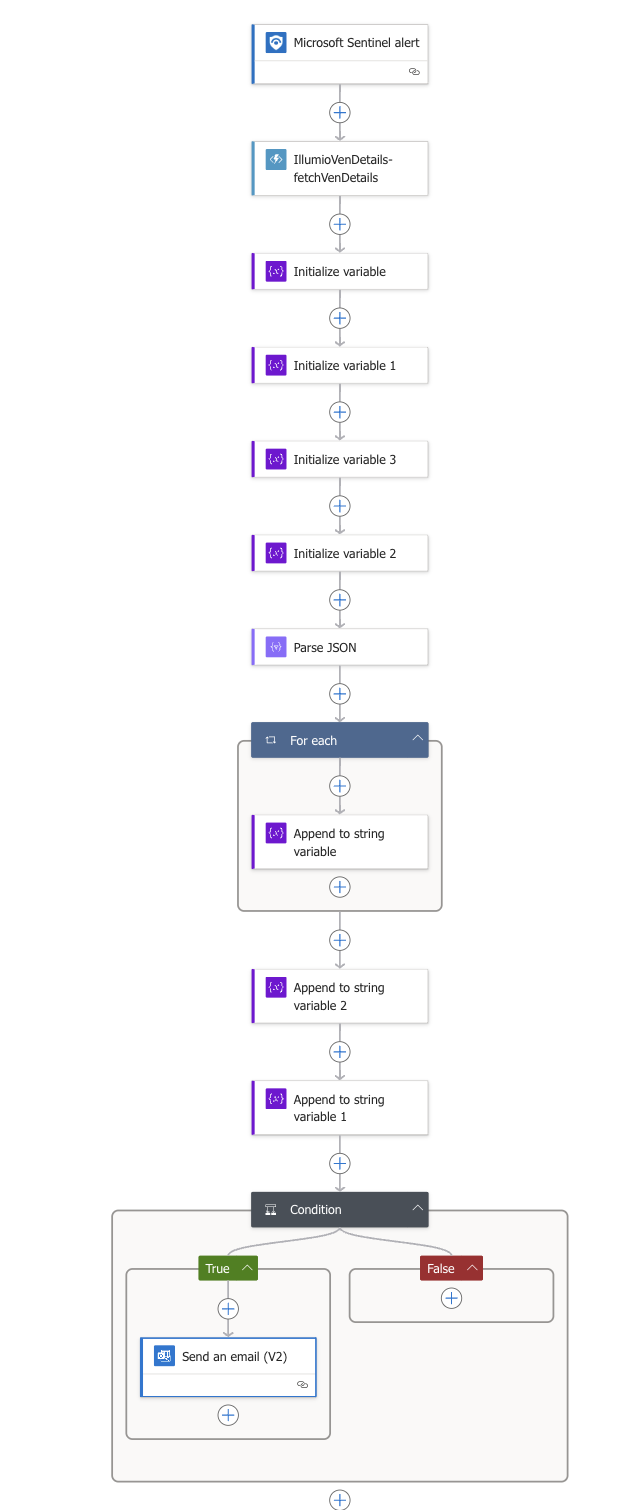 .
.
| Attribute | Value |
|---|---|
| Type | Playbook |
| Solution | IllumioSaaS |
| Source | View on GitHub |
Additional Documentation
📄 Source: Illumio-Get-Ven-Details/readme.md
Microsoft Sentinel Playbooks for Illumio Integration
Playbooks are collections of procedures that can be run from Microsoft Sentinel.
Get VEN Details Playbook
This playbook can be configured to respond to Microsoft Sentinel alerts.
- Once an alert is triggered, its body is sent to a function app.
- The function talks to the PCE with the help of api key/secret.
- Once VEN details are fetched from PCE, then the playbook constructs a table with the relevant information.
- Table comprises of, alert title, severity, ven details like ip address, hostname and labels and alert description.
- This is sent out as an email.
To deploy, follow the below link
Deploy the function app first:
Deploy logic app next:
This playbook creates API connections, since it needs to query/interact with Outlook 365 and Microsoft Sentinel.
Hence, ensure to provide "Deployers User name" as an email address.
Provide PCE fqdn, port, org id, api key and secret, click Next and follow next steps to deploy playbook.
Once deployed, authorize the api connections.
Browse: 🏠 · Solutions · Connectors · Methods · Tables · Content · Parsers · ASIM Parsers · ASIM Products · 📊